Konto, Adresse und Abonnement
Die Adresse Ihrer Website
Die Subdomain unter .nursee.ch, und wie Sie einen eigenen Domainnamen erhalten.
In diesem Artikel
Ihre Website hat eine Adresse im Internet. Zu Beginn ist es eine Subdomain von nursee: zum Beispiel pflege-plus.nursee.ch.
Sie können ihr danach Ihren eigenen Domainnamen geben, etwa pflege-plus.ch.
Die Subdomain unter .nursee.ch
Das ist die Adresse, die Sie bei der Erstellung Ihrer Website gewählt haben. Sie funktioniert einwandfrei, sie ist gesichert (das kleine Schloss im Browser), und Sie können sie Ihren Patienten ohne Bedenken geben.
So finden Sie sie: gehen Sie zu Websites → Seiten. Sie steht direkt unter dem Titel, und die Schaltfläche « Besuchen » öffnet sie in einem neuen Tab.
Warum eine eigene Domain?
Ein eigener Domainname — pflege-plus.ch statt pflege-plus.nursee.ch — bringt drei Dinge:
- Glaubwürdigkeit. Eine kurze Adresse wirkt auf einer Visitenkarte professioneller.
- Merkbarkeit. Ein Patient behält
pflege-plus.chleichter. - Unabhängigkeit. Die Domain gehört Ihnen. Wechseln Sie eines Tages den Anbieter, nehmen Sie sie mit.
Wo Sie Ihre Domain verwalten
Gehen Sie zu Websites → Website-Einstellungen und scrollen Sie ganz nach unten zum grünen Abschnitt mit dem Titel DOMAIN.
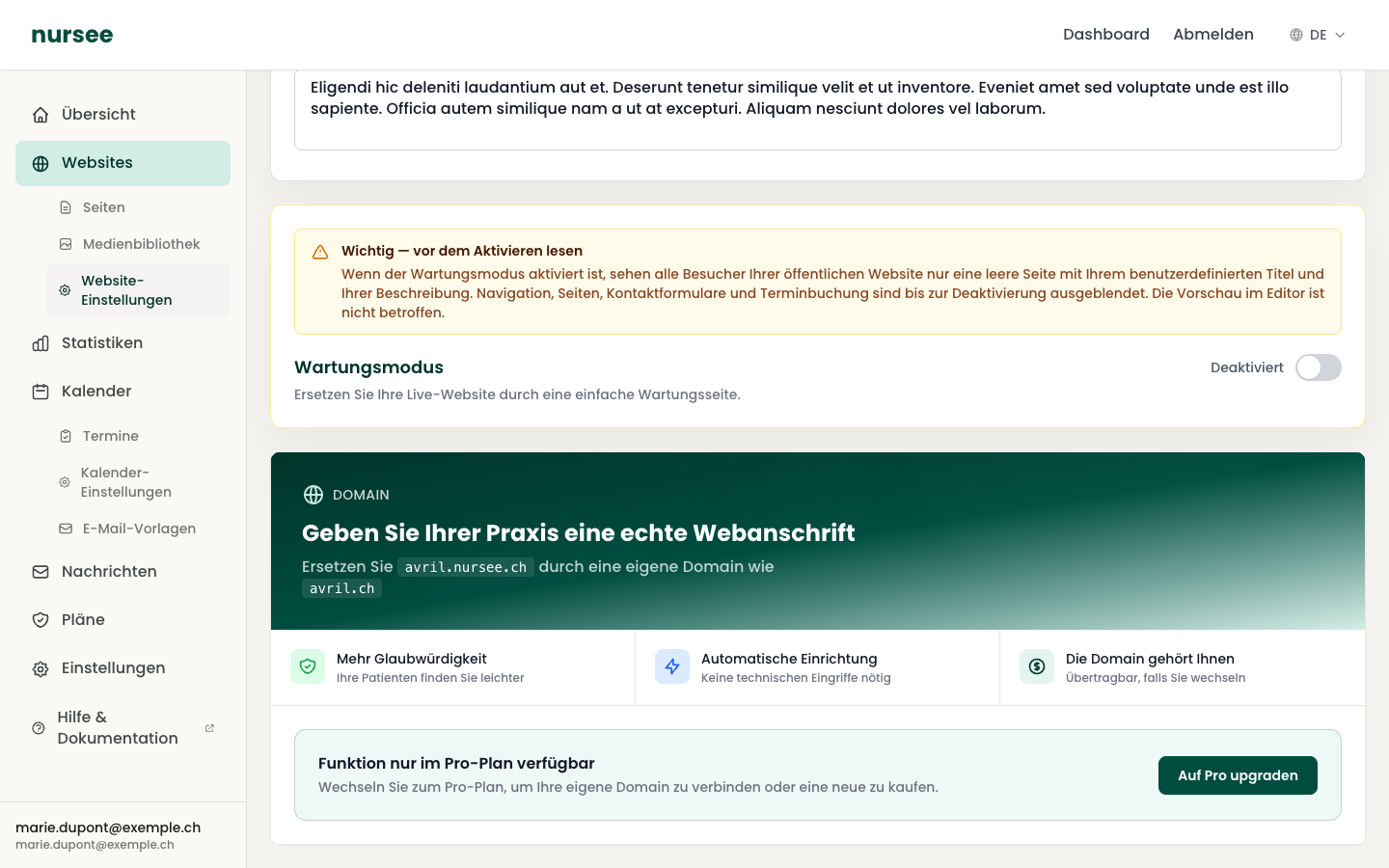
Es gibt zwei Möglichkeiten.
Möglichkeit 1 — Eine Domain kaufen (empfohlen)
Das ist mit Abstand das Einfachste: wir übernehmen alles.
Tippen Sie im Kasten « Eine .ch-Domain kaufen » den gewünschten Namen ein, ohne
.ch— zum Beispielpflege-plus.Klicken Sie auf « Prüfen ».
Das Ergebnis erscheint: die Domain ist verfügbar (mit ihrem Jahrespreis) oder schon vergeben.
Ist sie verfügbar, klicken Sie auf « Kaufen ».
Bestätigen Sie den Kauf im Fenster, das sich öffnet.
Die Einrichtung dauert in der Regel weniger als eine Minute. Sie sehen den Fortschritt Schritt für Schritt: Zahlung bestätigt, Domain registriert, DNS-Konfiguration, Aktivierung.
Sie müssen keine technische Einstellung vornehmen. Die Domain gehört endgültig Ihnen und ist übertragbar, falls Sie nursee eines Tages verlassen.
Möglichkeit 2 — Eine Domain verbinden, die Sie schon besitzen
Wenn Sie eine Domain anderswo gekauft haben (Infomaniak, Hostpoint, Gandi, OVH…), können Sie sie mit Ihrer Website verbinden.
Tippen Sie im Kasten « Ich habe schon eine Domain » Ihre vollständige Domain ein, zum Beispiel
meine-praxis.ch.Klicken Sie auf « Verbinden ».
Eine Tabelle mit DNS-Einträgen erscheint: Typ, Name, Wert.
Melden Sie sich bei Ihrem Domain-Anbieter an und fügen Sie diese Einträge in seiner DNS-Zone hinzu.
Kommen Sie zurück und klicken Sie auf « Konfiguration prüfen ».
Die Tabelle zeigt für jeden Eintrag, ob er Konfiguriert oder Nicht konfiguriert ist. Ein kleines Symbol kopiert jeden Wert mit einem Klick — so vermeiden Sie Tippfehler.
Sobald die Domain aktiv ist
Ein Kasten « Ihre Domain ist aktiv! » erscheint, mit der Kennzeichnung Verifiziert. Dort sehen Sie das Registrierungsdatum, das Ablaufdatum, das Datum der nächsten Erneuerung und ob die automatische Erneuerung aktiv ist.
Ihre alte .nursee.ch-Adresse funktioniert weiter und leitet auf die neue um: Patienten mit der alten Adresse gehen nicht verloren.
Die Erneuerung
Ein Domainname wird jährlich gemietet. Die automatische Erneuerung ist standardmässig aktiv, und das ist die richtige Einstellung: Sie müssen nichts überwachen.
Eine Domain trennen
Die Schaltfläche « Domain von der Website trennen » löst die Domain von Ihrer Website, ohne Ihr Domain-Abonnement zu kündigen: die Domain bleibt Ihnen und Sie können sie später wieder verbinden.
Einen guten Domainnamen wählen
- Kurz. Er muss auf eine Visitenkarte passen und am Telefon buchstabierbar sein.
- Leicht zu schreiben. Vermeiden Sie mehrere Bindestriche, Ziffern und Wörter mit heiklen Schreibweisen.
- Auf
.ch. Das ist die in der Schweiz erwartete Endung, und sie schafft Vertrauen. - Nah an Ihrem Tätigkeitsnamen. Ihre Patienten müssen die Verbindung sofort herstellen.