Die Seiten Ihrer Website
Suchmaschinen (SEO)
Meta-Titel und Meta-Beschreibung ausfüllen, um bei Google besser gefunden zu werden.
In diesem Artikel
Suchmaschinenoptimierung, meist SEO genannt, ist alles, was Menschen hilft, Sie über Google zu finden.
Sie müssen keine Fachperson sein. Zwei gut ausgefüllte Felder pro Seite leisten den grössten Teil der Arbeit.
Wo diese Einstellungen liegen
Öffnen Sie die Seite: Websites → Seiten → « Bearbeiten ».
Scrollen Sie im rechten Bereich zum Abschnitt « SEO ».
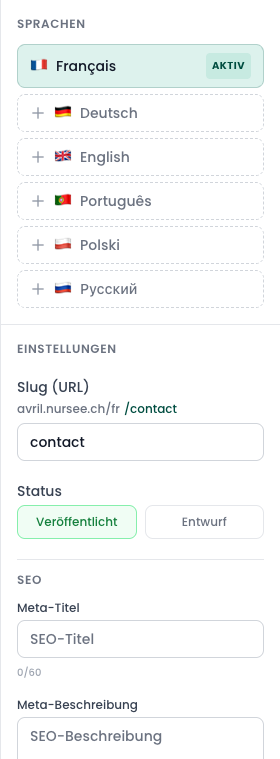
Der Meta-Titel
Das ist die blaue, klickbare Zeile, die Google in den Suchergebnissen anzeigt.
Einfache Regeln:
- etwa 60 Zeichen höchstens (ein Zähler erscheint unter dem Feld);
- schreiben Sie was Sie tun und wo Sie es tun;
- wiederholen Sie nicht auf jeder Seite Ihren Namen.
Gute Beispiele:
Pflege zu Hause in Bern | Pflege PlusSportmassage und Lymphdrainage — Thun
Schlechte Beispiele:
Startseite— sagt niemandem etwas.Seite 2— noch weniger.Die beste Praxis der Schweiz, Pflege, Massage, zu Hause, Bern, Thun, Biel— eine Liste aneinandergereihter Wörter. Google erkennt das und bestraft es.
Die Meta-Beschreibung
Das ist der kleine graue Absatz unter dem Titel in den Suchergebnissen. Ihr Argument in zwei Zeilen.
Einfache Regeln:
- etwa 150 Zeichen;
- schreiben Sie einen echten Satz, an einen Menschen gerichtet;
- schliessen Sie mit einer Einladung zum Handeln.
Gutes Beispiel:
Selbstständige Pflegefachfrau in Bern. Ich komme für Ihre täglichen Behandlungen zu Ihnen nach Hause. Abrechnung über die Grundversicherung. Termin online buchen.
Die drei anderen Dinge, die wirklich zählen
SEO ist mehr als diese zwei Felder. Diese drei Gewohnheiten sind mehr wert als jeder technische Trick:
1. Schreiben Sie für Ihre Patienten, nicht für Google
Verwenden Sie die Wörter, die Ihre Patienten wirklich benutzen. Sie suchen nicht « paramedizinische Leistungen im Domizilbereich »; sie suchen « Pflegefachfrau zu Hause Bern ».
2. Beschreiben Sie Ihre Bilder
Jedes Foto kann einen Alternativtext erhalten. Google sieht Bilder nicht: es liest ihre Beschreibung. Siehe Alternativtext und Fokuspunkt.
3. Benennen Sie Ihre Seiten klar
Eine Adresse wie /pflege-zu-hause versteht Google. /seite-3 sagt nichts. Siehe Seiten verstehen.
Eine Entwurfsseite wird nie gefunden
Google nimmt nur auf, was online ist. Prüfen Sie, dass Ihre wichtigen Seiten auf Veröffentlicht stehen. Siehe Veröffentlichen oder zurückziehen.