L'apparence de votre site
Le mode maintenance
Fermer temporairement votre site au public, en affichant une page d'explication.
Dans cet article
Le mode maintenance remplace tout votre site par une page unique et simple, avec un titre et un message de votre choix.
C'est le rideau de fer de votre boutique : plus rien n'est visible, sauf votre affichette.
Quand l'utiliser
- Pendant une refonte complète de votre site, pour ne pas montrer un chantier.
- Pendant une absence longue, si vous ne voulez pas recevoir de demandes de rendez-vous.
- En cas d'arrêt temporaire d'activité.
Pour une simple période de vacances où vous voulez rester joignable, ne l'utilisez pas. Bloquez plutôt les dates dans votre calendrier : voir Vacances et absences.
Activer le mode maintenance
Allez dans Sites web → Paramètres du site.
Descendez tout en bas, jusqu'à la section « Mode maintenance ».
Lisez l'encadré orange intitulé Important — lisez avant d'activer.
Remplissez d'abord les deux champs de la page qui sera affichée :
- Titre de la page — par exemple
Nous revenons bientôt.- Description — par exemple
Le cabinet est fermé jusqu'au 15 septembre. Pour toute urgence, appelez le 079 123 45 67.Basculez l'interrupteur à droite de « Mode maintenance » : il passe de Désactivé à Activé.
Cliquez sur « Enregistrer les paramètres », en haut à droite.
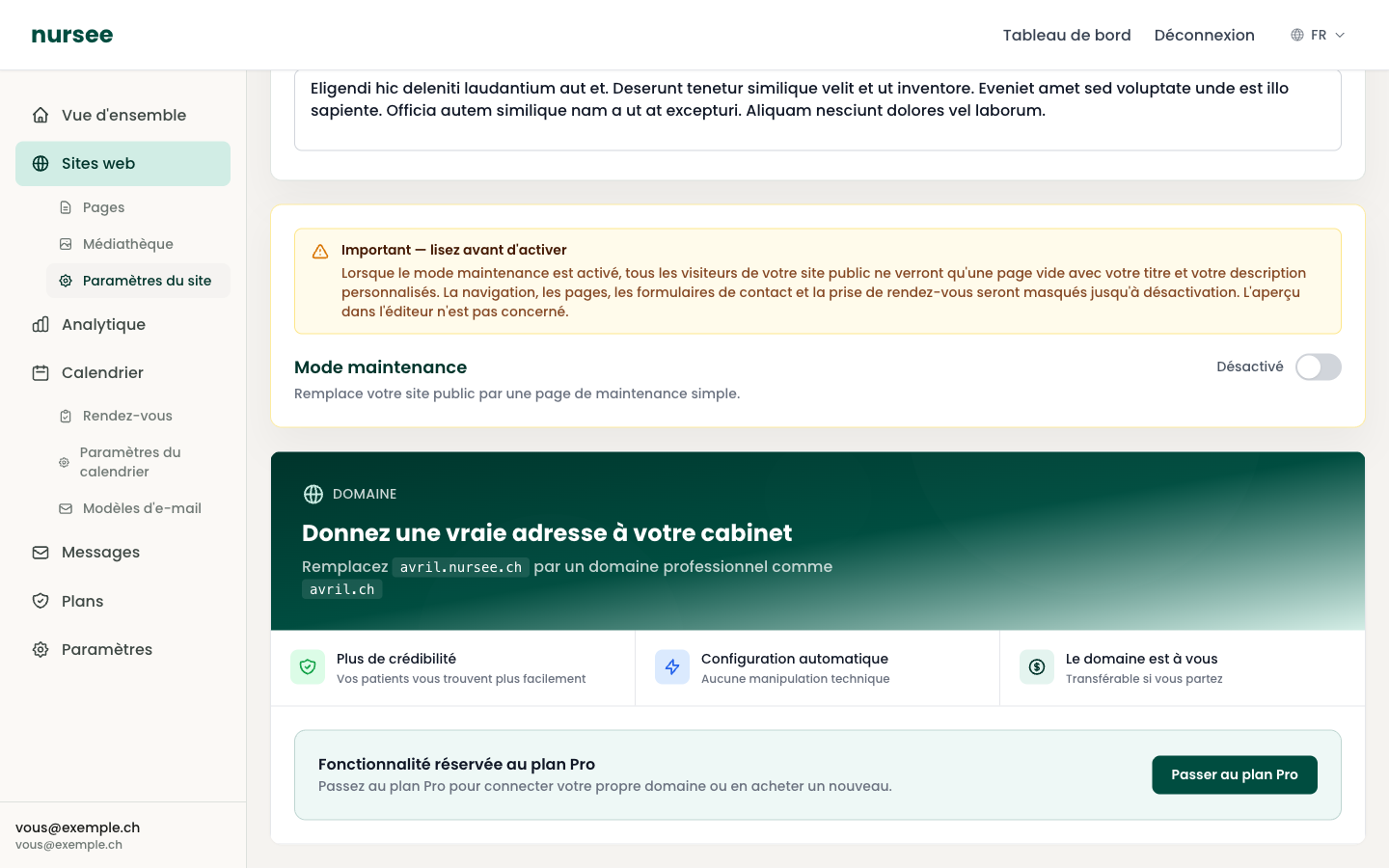
Ce qui se passe exactement
En revanche :
- votre tableau de bord fonctionne normalement, vous pouvez continuer à travailler ;
- l'aperçu dans l'éditeur n'est pas concerné, vous voyez toujours vos pages telles qu'elles seront ;
- rien n'est supprimé : vos pages, vos textes et vos photos sont intacts.
Bien rédiger votre message
Votre visiteur veut savoir deux choses : quand vous revenez et comment vous joindre en attendant. Donnez-lui les deux.
Bon exemple :
Mauvais exemple :
Le second message ne dit rien : le visiteur repart et cherche un autre soignant.
Vérifier que c'est bien actif
Quand le mode maintenance est activé, une étiquette orange « Maintenance » apparaît :
- dans le menu de gauche, à côté de Sites web ;
- en haut de votre tableau de bord.
C'est le rappel que votre site est fermé au public. Il est volontairement visible : on n'oublie pas un rideau baissé.
Désactiver le mode maintenance
Allez dans Sites web → Paramètres du site.
Descendez jusqu'à « Mode maintenance ».
Basculez l'interrupteur sur Désactivé.
Cliquez sur « Enregistrer les paramètres ».
Votre site redevient immédiatement visible, exactement comme avant. L'étiquette orange disparaît.